You can reward customer loyalty on Algrano by creating private offers. And this won't affect your margin, because it's your cost to sell that decreases. That's because we don't charge any service fee after you've been selling to the same roaster for 3 years. But we do charge a fee for sales to new roasters. So, if you only list one public offer for everyone, how should you price it? With the Matchmaking fee or without?
Passing on the fee vs absorbing it
Some producers choose to absorb the fee into their FOB price. In this case, you don’t need to do anything different. Make your public offers as usual and that’s it.
However, if you add the cost on top of your FOB price, your older and loyal buyers will end up paying more than they have to. You can avoid that easily, keeping these customers happy.
Cheaper for them, the same value for you
The best solution to reward your recurring customers is to separate your acquisition offer, listed publicly on the marketplace, from your loyalty offer, which is private.
We created this to reward relationships, making it cheaper for loyal roasters to buy from you without affecting the value you get from the sale.
If you have many buyers, it’s hard to keep track of how long they’ve been buying from you. So how do you find out for which sales you won’t get charged?
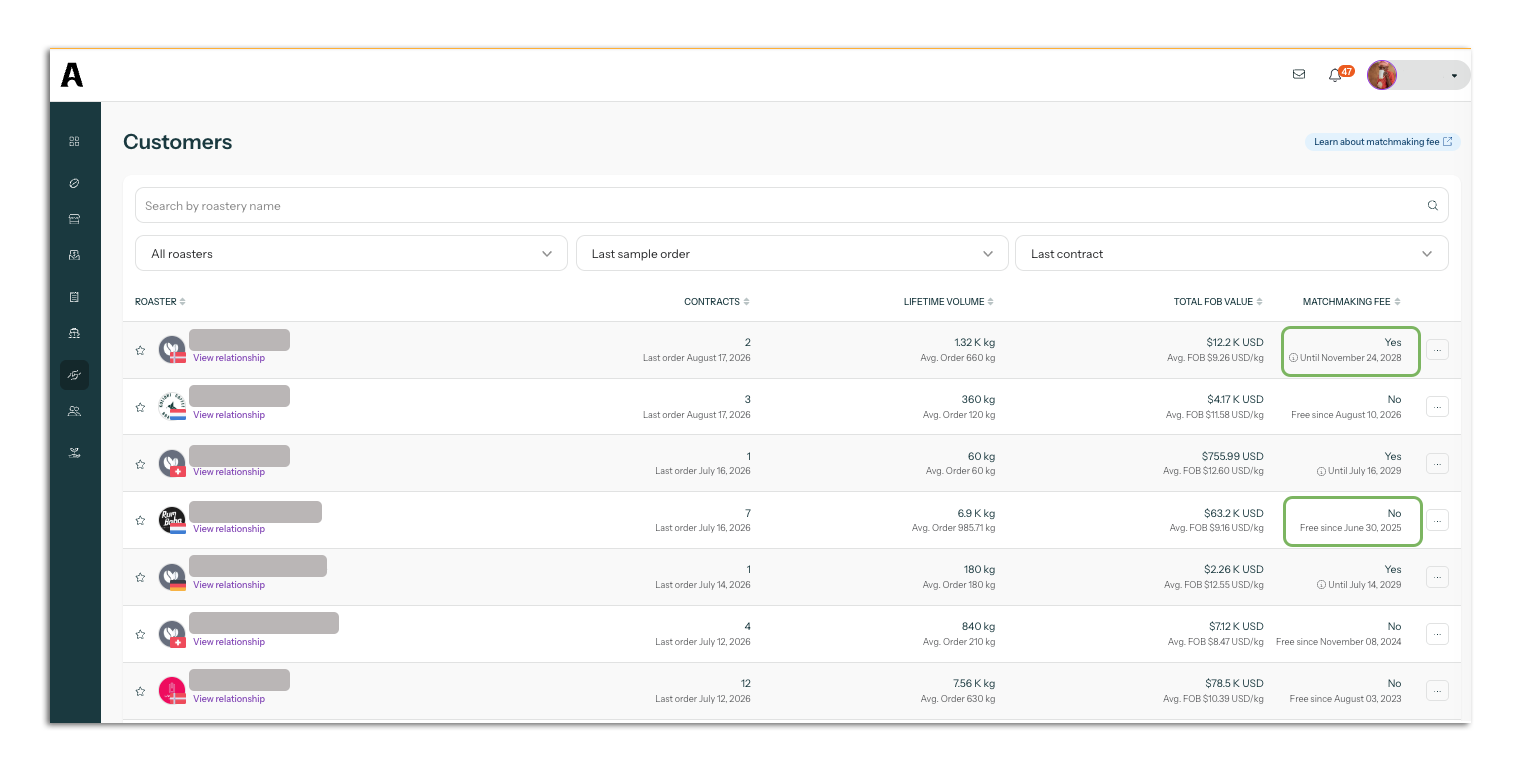
The information is all on your CRM. The last column of your Customers page says if the Matchmaking fee applies to the next sale you’ll make to the roaster or not.
Step by step
If you’re coming to your new season, follow the step by step to find out when private offers are needed:
- Open your Customers tab and click the arrow next to “Matchmaking fee”. This will reorganise the table, bringing all the 3+ years roasters to the top. You’ll be able to see all the roasters you can sell to for free. You should create private offers for them.
- Open your Sales page on another tab. Click on the first dropdown menu on the top left and select the name of the roaster you want to create a private offer for. You’ll see what coffee(s) they bought, the volume and the bag size.
- Make a list of all the roasters and the coffees they bought. Write down the coffee lot ID as well as the lot name. Add up the total volume for each lot.
- Go to your Coffees page, find the coffee lot ID your roaster bought and click on it. You’ll be taken to the lot detail page, from where you can create a new offer.
- Create the offer as you normally would. When you get to the Pricing configuration stage, don’t add the Matchmaking fee on top of your FOB price. At the bottom of the page, select “Private” to hide the offer.
- Copy the offer link and send it to the roaster. You can share the offer via the platform or email.
What if many roasters bought the same coffee?
If you have many old customers who buy the same coffee, you can simply create one private offer and share the same link with everyone. The offer should have enough volume to cover the needs of all roasters.
If a roaster decides to book more volume than expected, you can always add more by editing the inventory linked to that offer.
The only reason to have more than one offer per roaster is if you want to give them different FOB prices. Or, maybe, if you offer the same coffee in different bag sizes (for example, some roasters buy 35kg bags and others, 70kg bags).
What if the roaster wants to buy a new coffee?
The Matchmaking fee is applied to the relationship, not the coffee. The transaction is still free for you if the roaster is trying something new.